Showing posts with label NEWS. Show all posts

Friday, 22 February 2019

How to File Refund Claim Application:PACL

 How to File Refund Claim Application:PACL 2019

Market regulator Securities and Exchange Board of India (SEBI) had said the Justice RM Lodha Committee has decided to allow investors to file claims for PACL Ltd. The claim application for refund from PACL can be filed till 30 April 2019.

SEBI has created a separate website for accepting the claim forms from all investors of PACL who are seeking refund of their investment. To file the claim, the investor need to visit http://sebipaclrefund.co.in/ and submit her application. For submitting the claim, the investor needs to upload copy of her PAN card, latest passport size photo, copy of cancelled cheque, copy of PACL certificate and receipts, if any.


For investors who have changed their names or nominees of the investor, who is no more or incapacitated, SEBI says it will announce later a separate window for submission of claim applications. Such investors need to regularly check SEBI website or the PACL page on SEBI website https://www.sebi.gov.in/PACL.html.  
 
Here are 17 frequently asked questions (FAQs) on submitting claim for refund from PACL. These FAQs are provided by SEBI.
 
1. Which web browser is to be used for this website?
The website http://sebipaclrefund.co.in/ works best with the latest version of Google Chrome browser.
 
2. What is the process for registration of my claim?
For registration, you need to enter your PACL registration number twice, mobile number and captcha code. On entering the details, an OTP would be sent to the mobile number entered during registration. Once the OTP is successfully entered and if the details submitted are in order, your registration would be successful. Upon successful registration, you may start the process of submitting your claim application.
 
3. How do I login to my claim application?
On successful registration, you would be guided to a password creation screen. You can create a password of your choice. The password should be between 8-16 characters and contain at least one upper case letter (a-z), one numeral (0-9) and one special character. On successful creation of password, subsequent logins would need to be done using your PACL registration number and password. 
 
4. What information do I need to submit in the claim application form?
You need to submit your name as per PACL certificate, the claim amount (in Rs.), name as per PAN, PAN number, your bank account number, bank name and IFSC code of the bank branch.
 
5. What are the documents that I need to upload?
You need to upload copy of your PAN, latest passport size photograph, copy of cancelled cheque with your name printed or banker’s certificate per the prescribed format available at sebipaclrefund.co.in on the letter head of the bank, copy of PACL certificate, and receipts, if any.
 
6. Can I exit even though I have partially filled up the claim application form?
Yes, you can exit the applicant by clicking on the logout button. The information entered by you would be saved when you click on ‘Save and Next’ option. You can come later and log in to finish your claim application. 
 
7. What is the format of the documents to be uploaded?
The documents can be uploaded in pdf, jpg or jpeg (photo) formats.
 
8. What should be the specifications of the documents being uploaded?
The documents uploaded should be on black and white scale, 200dpi and vertically aligned.
 
9. How do I know if my application is successfully submitted?
After completion of all the required formalities, you may click on the ‘Final Submit’ button, upon which a preview screen will appear for confirmation of the information entered by you on the web platform. Upon your confirmation of the information entered, the application would be successfully submitted and an acknowledgement receipt number (ARN) would be generated. 
 
This number along with the PACL registration number should be used for all future communication.
 
10. Can I delete or edit the information I have saved?
You can edit or delete the information multiple times till you submit your application by clicking on the ‘Final Submit’ button. However, once you have clicked on the ‘Final Submit’ button no further changes would be allowed.
 
11. What if I forgot my password?
Click on ‘Forgot Password’ option on this website. Enter the PACL registration number and click on generate OTP option. Enter the OTP received on your mobile number and click on submit OTP. Once the correct OTP has been submitted, you would be taken to the ‘Enter password’ screen where you can create a new password.
 
12. What if I do not have a PAN card?
You would need to obtain a PAN card and then submit the application?
 
13. How do I obtain a PAN card?
To obtain information on how to obtain a PAN card, click on the this link https://www.incometaxindia.gov.in/Pages/tax-services/apply-for-pan.aspx
 
14. What if I do not have a bank account where I am the first holder?
You can submit the bank account details where you are a joint holder. The cancelled cheque copy with your name printed or banker’s certificates per the prescribed format available at sebipaclrefund.co.in on the letter head of the bank also needs to be uploaded along with the claim application.
 
15. What if the PACL certificate holder has passed away? Can any nominee make the claim on behalf of such deceased investor?
In such a case, the claim application can be submitted by the nominee whose name appears on the PACL certificate. However, date for the submission of claim applications through nominees shall be notified in due course. 
 
16. What if my name has changed due to marriage?
The date for the submission of claim applications in your new name together with supporting documents shall be notified in due course. 
 
17. In case of queries or complaints, where can I contact?
In case of queries or complaints, please call the helpline number 022-61216966.

Thursday, 21 February 2019

EPFO hikes Interest Rate for FY2019 : 8.65 %

EPF Interest Rate Hikes For 2019 : 8.65%
EPFO Hike Intrest Rate PF 8.65 % For 2019
New Delhi: The Central Board of Trustees of the Employees’ Provident Fund Organisation (EPFO) Thursday recommended hiking the interest rate for its 6-crore active subscribers to 8.65 per cent for the current financial year of 2018-19 from a five-year low of 8.55 per cent in the previous financial year.

HIGHLIGHTS

  • The rate of interest stood at 8.55 per cent for the Year 17-18
  • Employees' Provident Fund Organisation has over six crore subscribers.
  • The increase in interest rate will yield an interest rate higher than most small savings instruments, which are linked to yield on government securities. Among the small savings schemes, barring the Sukanya Samriddhi accounts for the girl child and 5-year savings scheme for senior citizens, most small savings rates are below 8 per cent... 
  • Tuesday, 8 January 2019

    How can I change an Airtel DTH package?


    You can upgrade your pack through online. For downgrade, you should call customer care.
    For Example:
    Changing from My Plan 99 to South Super Max 230 is Upgrade.
    Changing from South Super Max 230 to My Plan 99 is Downgrade.
    For Upgrade:
    1. Go to this website. https://www.airtel.in/s/selfcare/
    2. Enter your registered mobile number.
    3. Get OTP through SMS and enter it.
    4. Now you are logged in to your airtel account.
    5. Select DTH symbol seen in left side.
    6. Go to Connections tab.
    7. Select Change Base Pack option.
    8. Choose the pack which you wish to upgrade. Click Get it icon.
    Done!
    Warning: Once your pack is upgraded, you cannot downgrade as it becomes fall into lock-in-period until expiry date. So think carefully before upgrading your pack .

    Saturday, 5 January 2019

    how to disable web push notifications in Google Chrome?

    Step 1. Go to Settings.

    Click the icon of Settings at the right of your browser window and choose “Settings.”

    Step 2. Choose “Advanced” Settings.


    Go to the bottom of the page and choose “Advanced”.

    Step 3. Click “Content settings”.


    Click “Content settings” under “Privacy and security”.

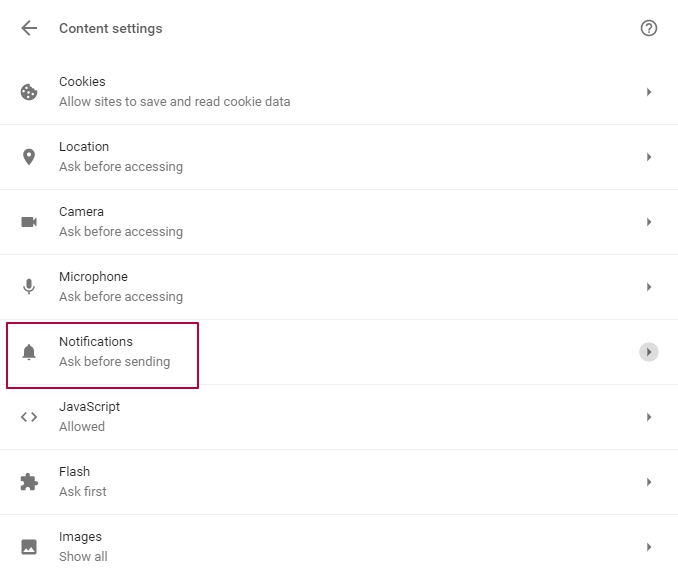
    Step 4. Choose “Notifications”.


    Click “Notifications”.
    Choose Notifications 

    Step 5. Enable or disable notifications.


    To enable notifications, click “Allow all sites to show notifications”.
    To disable notifications, click “Do not allow any site to show notifications”.
    If you are not sure, whether you want to receive notifications or not, click “Ask when a site wants to show notifications”.

     Step 6. Manage exceptions.

    If you once gave a permission to a website to show notifications, but now you do not want, choose “Manage exceptions” and put X to the right of the site. Click “Done”
    For your notifications not to be disabled, send them only to the users who gave you a permission by clicking "Allow push notification".
    This delivery channel is a great chance to empower your email marketing with. Inform about new arrivals, back in stock items and recent articles.
    TAGS:-turn off chrome notifications android
    turn off chrome notifications windows 10
    turn off google notifications android
    google chrome notifications spam
    chrome spam notifications android
    chrome notifications mac
    how to off chrome notification
    chrome push notifications

    Friday, 7 December 2018

    If you do not have any proof of address for online address update, you can opt for 'Aadhaar Validation Letter'. To update address

    If you do not have any proof of address for online address update, you can opt for 'Aadhaar Validation Letter'. To update address

    Keep your Aadhaar Address up-to-date
    Recently moved to a new city? Or have changed your residence? Do not forget to update your new address in your Aadhaar. You have Valid Address Proof or have received Address Validation Letter Letter (For those without Valid Address Proof), you can update your address by following either Option A or B.
    A) With Valid Address Proof
    ·         1. Login with Aadhaar
    ·         2. Enter your Recent/Correct Address
    ·         3. Upload Documents
    ·         4. Submit Request & Save URN


    Or


    B. With Address Validation
    ·         1. Login with Aadhaar
    ·         2. Enter Secret Code (received on letter)
    ·         3. Preview Address
    ·         4. Submit Request & Save URN

    Before proceeding to Update Address:
    ·         Verify if your mobile number is registered in your Aadhaar. Registered Mobile number is essential to login with your Aadhaar.
    ·         Remember to keep scanned images of the document proof you are required to upload.
    ·         If not sure, do check the List of Valid Document proof you are required to submit.
    Do not have valid address proof?
    Resident can still get their address updated in their Aadhaar with the help of Address Validation Letter sent by UIDAI.
    In order to request for the Address Validation Letter the Resident must get consent from an Address Lender/Verifier who would allow his/her Aadhaar registered Address to be used by the Resident. An Address Lender/Verifier could be a family member / relative / friend / landlord where resident is presently residing.
    Request for Address Validation Letter
    Step 1 – Resident Initiates Request
    1) Resident Logs in with Aadhaar
    2) Enters Verifier Aadhaar
    3) Get SRN
    Step 2 – Address Verifier Consents
    (Address Verifier Receives OTP intimation & Link for consent in his/her mobile)
    1) Clicks on Link
    2) Gives Consent
    Step 3 – Resident Submits Request
    Resident Receives confirmation of Verifier Consent on mobile)
    1) Logs in with SRN
    2) Preview Address
    3) Edit Local Language (If requires)
    4) Submit
    The Address Validation letter for the Resident will be sent to the Address Verifier's Address. After the resident receives the Address Validation Letter (via Post) the resident will be required to Login again and provide the Secret Code received by clicking on ‘Proceed to Update Address'
    button above
    Before proceeding to generate Address Validation Letter :
    ·         Both resident and Address Lender/Verifier are required to have their mobile numbers registered in their respective Aadhaar.
    ·         Both resident and Address Lender/Verifier will be required to get authenticated via OTP
    ·         The Address Lender/Verifier must be willing to give his/her consent allowing the Resident to use his/her address to be updated in resident's Aadhaar.
    ·         Both Resident & Verifier are required to be in synch while the Request for Address Validation Letter is still in process.
    ·         In case the Address Verifier misses giving consent within stipulated time the request will be invalid. The Resident will be required to initiate the process again.
    Note: Only Address of the Aadhaar holder can be corrected/updated online. Resident will have to visit an Enrolment/Update Center to update their Biometric or other Demographic data i.e Name, Date of Birth, Gender, Relation, Mobile and Email.

    Tuesday, 4 December 2018

    Best Sports Streaming Sites To Watch Sports Online

    Best Sports Streaming Sites To Watch Sports Online

    We all know very well that television is no longer the only channel of access to sports. Thanks to free streaming sports sites, fans from all over the world have different options available to choose from. There are hundreds of free streaming sports services and sites that allow you to follow your favorite team and favorite sport from any country. Hence, today in this article we will show you a list of 10 best sports streaming sites to watch sports online.
    Best Sports Streaming Sites To Watch Sports Online 2018


    Top 10 Best Sports Streaming Sites To Watch Sports Online 2018

    Basically, the TV, of course, Television is no longer the only medium of access to sports. Thanks to free streaming sports sites, fans from all over the world have different options available to choose from. There are hundreds of free streaming sports services and sites that allow you to follow your favourite team and favourite sport from any country.

    The sites we have chosen are live video platforms that are compatible with the widest range of possible devices and, in addition, with the most popular web browsers.


    1) Stream2Watch

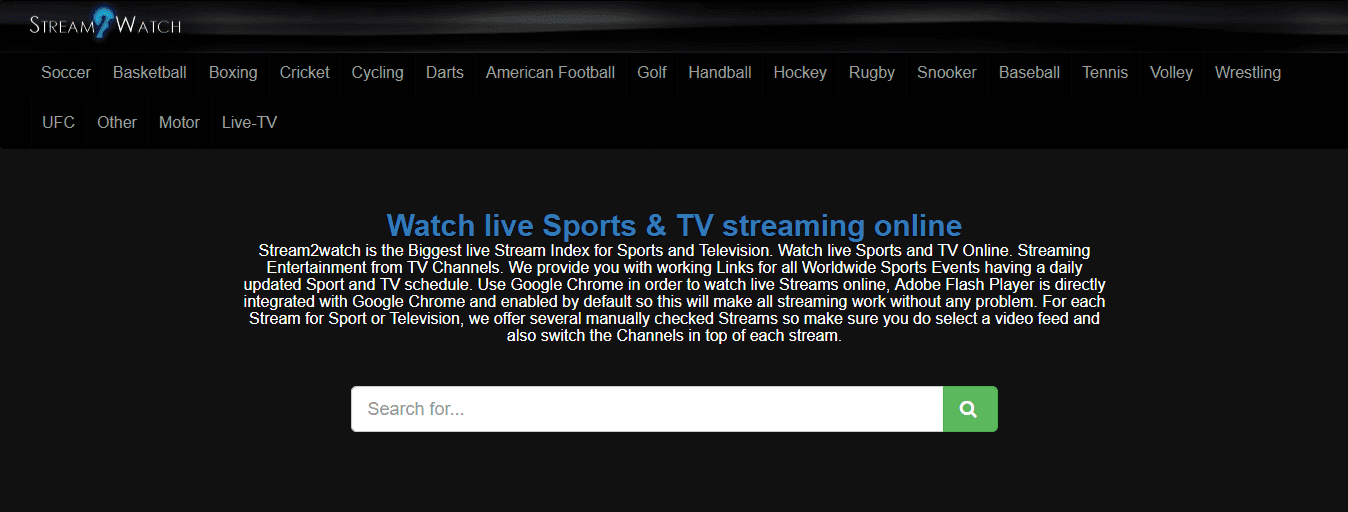
    Stream2Watch is one of the sites to see the largest sports streaming that exists today. Here you can see practically all important sporting events live. When you enter this website, you can see a very complete list of all the matches that are being broadcast at a certain time.
    In that list, you can search the games by sport, see the details of the participating teams, the time and the time at which it started. You just have to click on “Watch now” to enjoy your favorite sports for free. The only thing we did not like about this web page is the number of pop-ups that appear during its use, which can be annoying.

    2. FromHot

    It’s a free sports streaming site where you can stream sports events abut Hockey, Football, Basketball, tennis, Baseball, Motorsports, Golf etc. The user interface of this site is also very clean and responsive. The homepage contains all the live streaming which you access pretty quickly. Every stream is free to watch; you don’t have to pay a single penny!

    3) WatchESPN

    It is a free streaming service offered by the ESPN channel, one of the number one channels in sports broadcasts. This site is only available in some countries. If it is not available in your country, try another site that we present in this list.
    The web has a great user interface and is the best if you are interested in sports in the United States. If you’re not very interested in North American sports, you’d better choose another sports site.
    ESPN is by no means the world leader in sports, its site offers exclusive services and the one of good thing about this site is that it is free of any type of annoying or invasive advertisings.

    4) VIP League

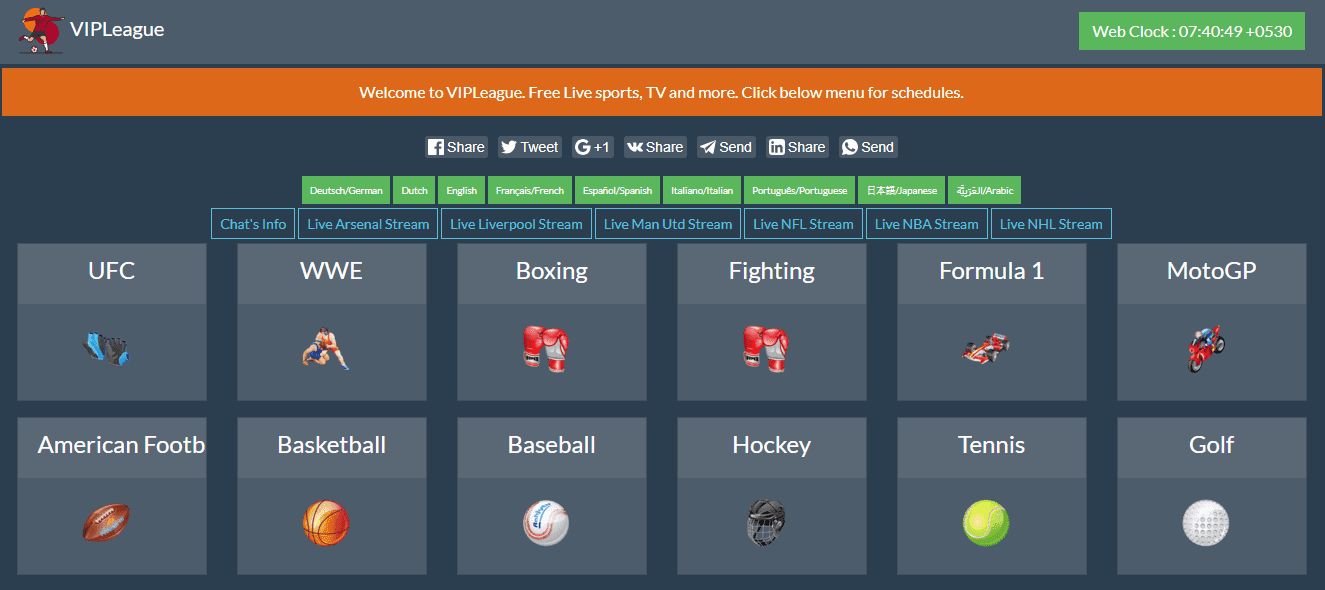
    VIP League is another service that we can not recommend if you want to see all kinds of sporting events live, from traditional sports such as football and baseball to more specialized such as Cricket and Hockey.
    Its main page offers easy access to live broadcasts, by classifying them by categories that you can review to get the events in which you are interested. Do not forget to visit VIP League web portal.

    5) Batman Stream

    Batman Stream is one of the best sites to stream multiple sports such as football, basketball, baseball, handball, among others. The best thing about this portal is that it allows you to search with great ease and accuracy, all the favourite sporting events live and watch them online for free.
    Here you can find all the important leagues: UEFA Champions League, La Liga, Premiership, Serie A, Bundesliga, Ligue 1. In general, this is a modern-looking site that is constantly updated and provides a lot of options and links to see the transmissions.

    6) Mama HD

    A site recommended by many other websites, and by a large number of users endorse it as the best streaming site to watch soccer. The traffic to this site has been in continuous growth lately showing the boom in its popularity.
    Keep in mind that, depending on the way you access this website, you will be redirected to a certain sport, so if you see yourself on the page dedicated to the NBA, do not worry because you can access transmissions from other sports disciplines without any problem.

    7) Yahoo! Sports


    Are you having problems with any of the streaming sites we mentioned? You can simply visit the Yahoo site dedicated to sports to find out about the sports scene. Of course, it has many restrictions as to which content they can transmit.
    You can use Yahoo! Sports to get the latest news in almost any sport. You can read articles, watch short videos related to the event in which you are interested. It is worth visiting this portal if you are unable to use any of the other alternatives we offer.

    8) Livefootballol.me

    If you are looking for a site that offers the best soccer streaming, look no further. This site is the favourite of fans of the sports king due to its reliability, as it is always online, even when their servers are subjected to heavy loads during the most important games.
    It is possible to start watching a live football broadcast with a few clicks. We really liked its simple user interface that allows you to use a computer at least simply to find the game you want to see. In addition, its load times are minimal and responds very quickly.

    9) Hotstar


    The well-known Hotstar streaming service simply allows you to stream TV series, Hindi movies, and sports for free. As the well-known site has all the latest movies, shows, and sports highlights are available to watch but the restricted thing is that the download permissions are limited to certain movies only.

    10) Sony PlayStation Vue


    The well-known Sony PlayStation Vue is basically a live streaming TV service where you can simply watch sports, news, movies, TV shows, premium channels and much more. Although the well-known Sony PlayStation Vue service is paid, don’t worry about that, as this service also offers a free trial to all the users.

    11) Willow TV


    Basically this well-known online streaming service, of course, the Willow TV owned is actually by The Times Group which is an American Sports channel and the leading broadcaster of live 24×7 cricket in the United States and Canada.

    Monday, 3 December 2018

    Airtel Best Selling Prepaid Plans Are Here

    Airtel Best Selling Plan -(Itechever.com)


    Bharti Airtel is India’s top telecom service provider, headquartered in Gurgaon. The company, driven by Sunil Bharti Mittal, has operations in 20 countries across Asia and Africa. In 2012, it has become fourth-largest telecom service provider worldwide in terms of subscriber base. In India, the telco operates in all 22 telecom circles with offerings that include 2G, 3G and 4G wireless services, mobile commerce, fixed line, high speed DSL broadband, IPTV, DTH and enterprise services including national and international long distance services.

    Company has African operations in Burkina Faso, Chad, Democratic Republic of the Congo, and Republic of the Congo, Gabon, Ghana, Kenya, Malawi, Madagascar, Niger, Nigeria, Rwanda, Seychelles, Sierra Leone, Tanzania, Uganda and Zambia.
    Bharti Airtel also offers mobile wallet service Airtel Money that allows users to make payments for utility bills, goods and services in addition to money transfer across networks.

    In January 2017, the telco also launched Payments Bank operations across 29 Indian states. The entire banking process at Airtel Payments Bank can be carried out digitally through an app available on both iOS and Android platforms and consumers can also use USSD and IVR for transactions. The company support Aadhaar-based e-KYC and subscribers’ mobile numbers act as their bank account numbers.

    In 2017, Bharti Airtel has entered into definitive agreement with Telenor South Asia Investments to acquire Telenor India Communications in order to get access to Telenor-operating seven circles including Bihar, Andhra Pradesh, Assam, Gujarat, Maharashtra, UP East and UP West.


    Airtel Best Selling Recharge


    Featured post

    SBI Customer Care, 24x7 Toll Free Number

    SBI Customer Care, 24x7 Toll Free Number SBI Customer Care, 24x7 Toll Free Number State Bank of India (SBI) is the largest bank of the co...

    Featured